RTCC Warning in PMS

RTCC Warning in PMS

If client gets RTCC  warning in PMS like on picture:
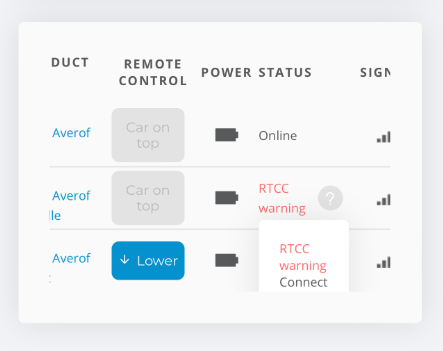


You can also find the photo of RTTC warning in PMS at the following link: https://file.parklio.co/file/8zevxf27e2d3785174d4ba97488df3d3cb239

That means client probably disconnected battery from barrier to recharge it and return it back without connecting to barrier over Parklio App. This signals time and date not set for barrier.

To resolve issue, please connect to barrier over App and do one lower and extension over App.


    • Related Articles

    • PMS Licenses

      The licenses page provides users with valuable insights to optimize their licensing configurations, displaying the products that have already been added to the account and the maximum number of products that are available to add. Clients usually ...
    • PMS Start Instructions

      Once users have requested access to the PMS, the Parklio team will send an invitation email to them. The "Get Started" button redirects you to the PMS website: You can also find the image of an invitation to PMS at the following link: ...
    • PMS Password Change Instructions

      To edit profiles while logged into PMS, click on the icon displaying your profile name in the top right corner. Next, select "User Settings" to access the "Manage Profile" tab, which includes "User Profile" and "User Security" sub-tabs. The User ...
    • PMS Roles - Parking Managers

      The Parking Managers page contains the list of all managers in the Parking Management System. It is possible to edit Manager information from the list or remove them from the System. Managers have different roles: • Operator – Adding products to PMS, ...
    • Adding Devices to PMS - Gateway

      To connect any Parklio device directly to the PMS, it is not necessary to add a Gateway, as the devices can connect to the app on their own. However, using a Gateway provides additional features and more possibilities when controlling Parklio ...